Walk onto any modern production floor and you’ll see the same handful of building blocks repeated again and again — a controller running the logic, a screen showing what’s happening, sensors feeding it information, and cables or wireless links tying it all together. Understanding these components — and how they work as a system, not just individual parts — is the first step to designing automation that actually works.
Why Think in Terms of a “System”?
It’s tempting to think of automation as a single device — “the PLC” or “the HMI.” In practice, none of these components do much on their own. A PLC without sensors has nothing to react to. An HMI without a PLC has nothing to display. The value of automation comes from how these pieces are connected and coordinated, so it’s worth understanding each layer before deciding what a project actually needs.
The Core Components
1. The Controller (PLC)
The Programmable Logic Controller is the decision-maker of the system. It continuously scans inputs, runs the programmed logic, and outputs commands — turning a motor on, opening a valve, triggering an alarm. Modern PLCs also handle communication, data logging, and in many cases, direct cloud connectivity, making them far more than a simple relay replacement.
2. The Interface (HMI)
The Human-Machine Interface is how operators actually interact with the process — starting and stopping equipment, adjusting setpoints, viewing alarms, and monitoring trends. A well-designed HMI turns raw PLC data into something an operator can read and act on in seconds, which directly affects how quickly problems get caught and resolved.
3. Sensors and Actuators
Sensors are the system’s senses — measuring temperature, pressure, position, speed, or presence. Actuators are how the system acts on the physical world — motors, valves, relays, and drives that carry out the PLC’s commands. Together, they form the feedback loop that lets a system respond to real conditions instead of running blind.
4. Motor Control (Frequency Inverters)
Wherever a motor needs variable speed, torque control, or soft starting, a frequency inverter sits between the PLC and the motor. It converts simple on/off or speed-reference signals into precise motor control, improving both process accuracy and energy efficiency compared to running a motor at fixed speed.
5. Communication Networks
None of these components are useful in isolation — they need to talk to each other. Industrial networks like Ethernet, RS485/Modbus, and increasingly MQTT connect PLCs, HMIs, drives, and sensors into a coordinated system, and extend that connectivity out to supervisory systems, databases, and the cloud.
6. IoT Gateways and Cloud Connectivity
This is what separates a “modern” automation system from an older, isolated one. An IoT gateway bridges existing field devices — PLCs, HMIs, sensors — with cloud platforms, enabling remote monitoring, alarm notifications, and diagnostics without requiring an engineer to be physically on site.
Think of it as a stack: sensors and actuators sit at the bottom, the PLC coordinates them, the HMI puts a human in the loop, and communication networks — including IoT gateways — tie the whole system to the wider world.
How These Components Work Together
Consider a simple example: a conveyor system with a variable-speed motor. A sensor detects product on the belt and sends a signal to the PLC. The PLC decides how fast the belt should run and sends a speed reference to the frequency inverter, which adjusts the motor accordingly. An operator watches the whole process on the HMI, and if the system is connected through an IoT gateway, a plant manager can check the same status from a phone, miles away. Each component plays a distinct role — but the system only works because they’re integrated.
Choosing the Right Components
There’s no single “correct” combination — the right components depend on the size of the process, the number of I/O points needed, and how much visibility and remote access the application requires. A small standalone machine may only need a compact PLC and a small HMI, while a multi-line facility benefits from networked drives, larger HMIs, and an IoT gateway tying everything into a central dashboard.
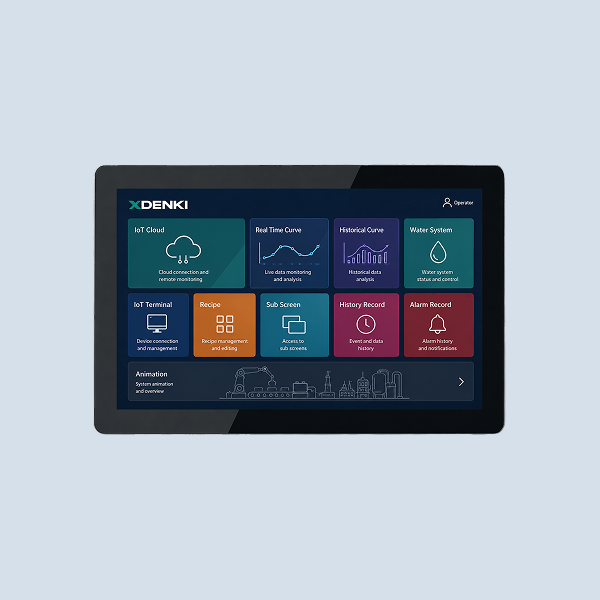
The interface layer is where operators actually experience an automation system, and the XDENKI HT3000-D Series IoT HMI is built to make that experience count. With a high-resolution industrial touchscreen, built-in cloud connectivity, and seamless PLC communication, it turns raw process data into something operators can monitor and control at a glance — while also enabling remote diagnostics from anywhere.